Practical workflows
Turn a Flowchart into a Text Contract Without Losing a Branch
A diagram's words tell you what the boxes say. Its connections tell you what happens next. Preserve both before handing the process to a person or an AI coding tool.
Give each step a stable ID, record every arrow as a condition and destination, then walk a few concrete cases through the result. Keep return arrows and unresolved questions explicit. The output is a text contract: a precise written description of the steps and decisions that someone can follow without looking at the picture.
Below is a complete worked contract for a fictional workshop equipment request. Replace its rules with the ones in your own source; it is an example of the method, not a recommended borrowing policy.
The complete text contract
PROCESS: Workshop equipment request — fictional example v1
SOURCE: Original six-node diagram accompanying this guide.
START: A request arrives.
REQUIRED DETAILS: requested item, event date, contact.
N1 Receive request -> N2.
N2 Are all required details present?
  No -> N3 Ask for the missing details.
  Yes -> N4 Check whether the requested equipment is available.
N3 Wait for a revised request. On receipt -> N2, not N4.
N4 Is the requested equipment available for that event date?
  Yes -> N5 Send reservation confirmation. END: confirmed.
  No -> N6 Send unavailable reply. END: unavailable.

CONNECTIONS:
N1 -> N2 [request received]
N2 -> N3 [No: incomplete]
N3 -> N2 [revised request received]
N2 -> N4 [Yes: complete]
N4 -> N5 [Yes: available]
N4 -> N6 [No: unavailable]

CASES:
A. Complete + available: N1, N2 Yes, N4 Yes, N5.
B. Incomplete, then complete + available:
   N1, N2 No, N3, N2 Yes, N4 Yes, N5.
C. Complete + unavailable: N1, N2 Yes, N4 No, N6.

UNDEFINED IN THIS DIAGRAM:
No-response timeout; availability changing during review;
who may override an unavailable result.
Do not add these rules without the process owner's decision.
A complete example to adapt to your task.
Open the complete text to save as a file ↗Start with one diagram and one boundary
Suppose a community workshop keeps its equipment-request process in a PDF. An operator now needs to explain it to the person building a simple request form. Extracting “Receive request”, “Complete?” and “Available?” is useful, but it does not say whether missing details should end the process or send the request back for another review.
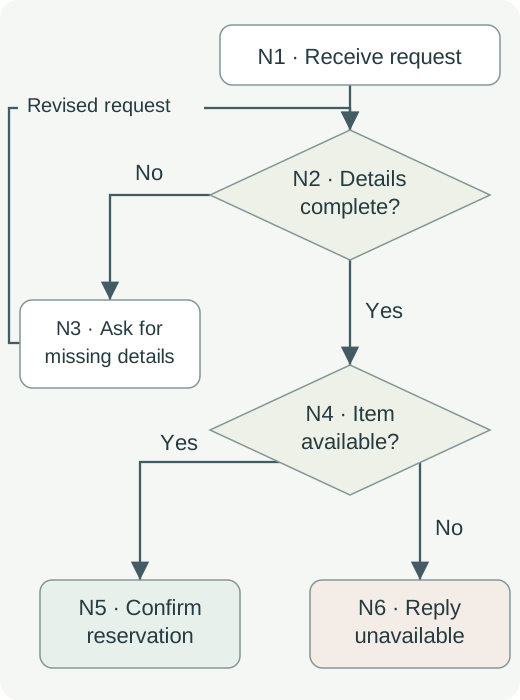
Our source is the original illustration below. It starts when a request arrives and ends with either a reservation confirmation or an unavailable reply. The required details are the item, event date and contact. Those rules belong to this fictional example; they are not facts about CleanMD or any lending service.
1. Give every step an ID before rewriting it
Work from the original image, not from the order in which extracted words happen to appear. Assign an ID to every step and decision. Preserve the label first; clarify its meaning in a separate column. If two boxes both say “Review”, they still need different IDs.
A stable ID lets you say “return to N2” even if you later improve a label or move a box. It also prevents an implementer from treating two similarly named steps as one.
| ID | Meaning | Role in the process |
|---|---|---|
| N1 | Receive the request | Entry |
| N2 | Are item, event date and contact present? | Decision |
| N3 | Ask for the missing details; wait for revision | Action and wait |
| N4 | Is the requested item available for that date? | Decision |
| N5 | Send reservation confirmation | Terminal outcome |
| N6 | Send unavailable reply | Terminal outcome |
2. Turn each arrow into a row
Choose a node and trace each arrow leaving it until you reach the next node. Write the starting ID, the arrow's condition and the destination ID. Repeat from each node. A line crossing another line is not automatically a junction; inspect the arrowhead or connector mark in the original.
The most easily lost relationship here is N3 → N2. A corrected request must be checked for completeness again. Sending it directly to availability checking would silently change the process.
| From | Condition or trigger | To |
|---|---|---|
| N1 | Request received | N2 |
| N2 | No — details incomplete | N3 |
| N3 | Revised request received | N2 |
| N2 | Yes — details complete | N4 |
| N4 | Yes — item available | N5 |
| N4 | No — item unavailable | N6 |
If an arrow has no label, write “condition not shown” instead of inventing one. If a connector points to another page, record that destination and get the missing page before treating the process as complete.
3. Walk the decisions with concrete inputs
Try the text without looking at the diagram. A complete request for an available item should reach confirmation. A complete request for an unavailable item should reach the unavailable reply. An incomplete request should wait for revised details and return to completeness checking.
Use the table to check the handoff, then compare the path back to the original diagram. These are illustrative trace cases, not results from a running application.
| Case | Input and change | Expected path |
|---|---|---|
| A — direct confirmation | Item, date and contact supplied; item available | N1 → N2 Yes → N4 Yes → N5 |
| B — correction | Contact absent; revised request adds it; item available | N1 → N2 No → N3 → N2 Yes → N4 Yes → N5 |
| C — unavailable | All details supplied; item unavailable | N1 → N2 Yes → N4 No → N6 |
Together, these cases traverse all six recorded connections. They do not test every possible execution: a request might return several times, and the diagram gives no timeout when nobody replies. Keep that limitation visible. Do not replace an undefined wait with an invented rejection rule.
4. Make the unknowns part of the handoff
Attach the source name, page or figure number, and the version you used. Send the node inventory, connections and expected cases together. Tell the implementer which questions are unresolved and who can answer them.
For this example, ask the process owner what happens if no revision arrives, whether equipment can become unavailable during review, and who can authorize an exception. Those questions may change a future version. Until answered, they are open requirements.
If you use an AI coding tool, supply the verified text contract and ask it to generate a proposed implementation and cases from those rules. Require it to list any missing rule separately. Review the generated result against the source; a well-structured prompt does not prove the implementation is correct.
Where CleanMD can help
When the process is embedded in a permitted PDF or image, CleanMD can prepare the surrounding text as Markdown on iPhone. Import the source, choose an output mode, convert and preview it, then copy or save the result. Its public listing supports those preparation steps; this guide does not claim a device test.
Keep the original diagram open while building the node and connection tables in your receiving editor. Extracted labels do not establish arrow direction, branch conditions or loop behavior, and this workflow does not depend on CleanMD reconstructing them automatically.
Conversion sends the selected file to a third-party parsing service. Use a public or otherwise permitted document whose processing you accept. You can also transcribe the diagram directly when uploading it is inappropriate.
Leave a readable explanation beside the picture
A text contract helps the implementer, but the same relationships also belong in the reader-facing explanation. W3C's complex-image guidance calls for a text alternative that carries the image's essential information. Boise State demonstrates numbered steps with explicit decision destinations, and UMass Dartmouth emphasizes stating relationships and outcomes in text.
For this example, the short explanation is: review each request for the item, date and contact; ask for missing details and recheck the revised request; when complete, confirm available equipment or reply that it is unavailable. Keep the fuller contract nearby for people who need exact steps.
The finished handoff should let another person follow the process, point to each source connection and identify what still needs a decision. That is the useful result—not merely a page of extracted box labels.